Hantera aviseringar för Chat + Conversations
When customers send a message through your Websites + Marketing site's chat widget, you'll also get an email notification. You can turn these notifications off or change the email address they're sent to.
Note: The GoDaddy mobile app is not available with free Conversations plans.
Required: You need a Websites + Marketing plan to use Chat + Conversations. If you're subscribed to Conversations standalone you won't have this feature.
- Logga in på din GoDaddy-mobilapp.
- At the bottom of the screen, tap Conversations to see a list of all your unarchived conversations.

- In the top-right corner, tap
 more, and then tap Settings.
 - Next to Email Notifications, to receive chat messages through email, turn the toggle on (shows green). To stop receiving chat messages through email, turn the toggle off (shows white).
- Du får e-postmeddelanden på den primära e-postadressen som är kopplad till ditt GoDaddy-konto. För att ändra det, följ stegen som beskrivs i fliken Webb i den här artikeln.
- To receive notifications in the GoDaddy mobile app whenever you get new messages, select Manage in Device Settings.
- Tillåt meddelanden i appar för GoDaddy Conversations.
- Logga in på din GoDaddy-mobilapp.
- At the bottom of the screen, tap Conversations to see a list of all your unarchived conversations.
- In the top-right corner, tap
 settings.
 - Next to Email Notifications, to receive chat messages through email, turn the toggle on (shows green). To stop receiving chat messages through email, turn the toggle off (shows white).
- Du får e-postmeddelanden på den primära e-postadressen som är kopplad till ditt GoDaddy-konto. För att ändra det, följ stegen som beskrivs i fliken Webb i den här artikeln.
- To receive notifications in the GoDaddy mobile app whenever you get new messages, select Manage in Device Settings.
- Tillåt meddelanden i appar för GoDaddy Conversations.
- Gå till din GoDaddy- produktsida .
- Rulla ner, expandera Websites + Marketing och välj Hantera bredvid din webbplats.
- Expandera Conversations i menyn till vänster och välj Inställningar .
- Välj Aviseringar .
- För att ta emot chattmeddelanden via e-post, vrid på
 växla till (visas grönt). Stäng av reglaget för att sluta ta emot chattmeddelanden via e-post (visas vitt).
 - Du får e-postmeddelanden på den primära e-postadressen som är kopplad till ditt GoDaddy-konto. Om du vill ändra den skriver du in den nya e-postadressen i rutan.
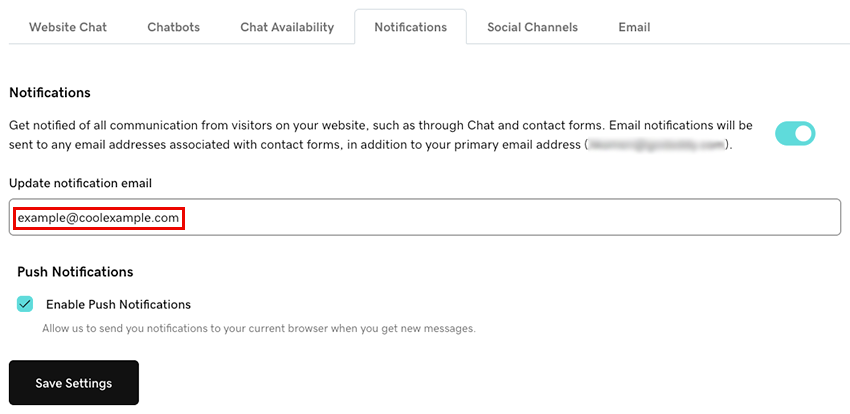
- För att få aviseringar i din webbläsare när du får nya meddelanden via Conversations markerar du kryssrutan Aktivera push-aviseringar . Detta skickar meddelanden till din nuvarande webbläsare.
- Välj Spara inställningar för att spara dina ändringar.
Om du har problem med att konfigurera dina aviseringar kan du prova stegen i vår beskrivning om felsökning av aviseringar för Chat + Conversations .