Växla mellan mina olika GoDaddy Conversations-inkorgar
Om du har mer än ett företag kopplat till GoDaddy Conversations kan du enkelt växla mellan dina olika enhetliga Conversations-inkorgar för att läsa meddelanden om det.
Note: The GoDaddy mobile app is not available with free Conversations plans.
- Any time a customer sends a message through any of the channels you’ve connected to GoDaddy Conversations, you’ll receive a notification on your mobile phone. The notification will tell you which business it’s for and who it’s from.

- Tap the notification to be taken directly to the conversation thread in the GoDaddy mobile app, from where you can respond to the message.
- To switch to an inbox for a different venture, from your inbox, tap your business name at the top of the screen. A list of your businesses will show.
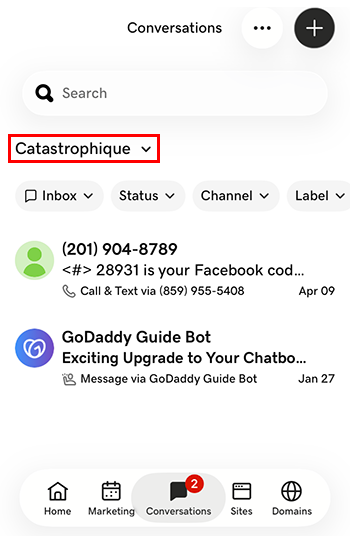
- Tryck på det företag du vill växla till. Du kommer till inkorgen för det satsningen.
- Gå till din GoDaddy produktsida för i en webbläsare.
Om du har den fristående versionen av Conversations expanderar du Conversations Unified Inbox . Välj Webbinkorg till höger om ditt Conversations-paket.
ELLER
Om du har ett Websites + Marketing-paket bläddrar du till Websites + Marketing och väljer Hantera bredvid din webbplats. Expandera Conversations i den vänstra menyn.
- Välj Inkorg . En lista över dina arkiverade konversationer visas.
- Välj ett meddelande som ska tas direkt till konversationstråden, varifrån du kan svara på meddelandet.
- To switch to an inbox for a different venture, on the far left of your screen, select the venture you want to switch to. You’ll be taken to the dashboard for that venture.
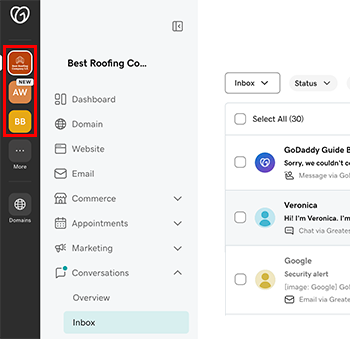
- Expandera Konversationer i menyn till vänster och välj sedan Inkorg för att gå till inkorgen för det satsningen.