Edit an SOA record
SOA (start of authority) records are DNS records that store important information about the domain, such as the primary nameserver and an administrator email address. Every domain must have an SOA record, but only accounts with Premium DNS are able to edit these records.
Note: SOA records cannot be manually added or deleted.
- Sign in to your GoDaddy Domain Portfolio. (Need help logging in? Find your username or password.)
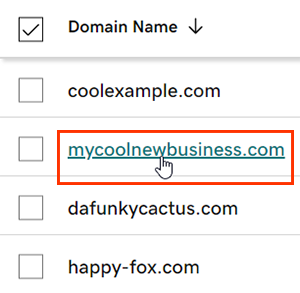
- Select an individual domain to access the Domain Settings page.
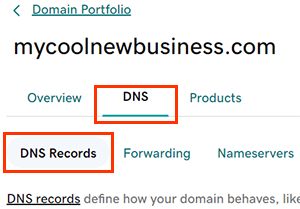
- Select DNS to view your DNS records.
- Select
 Edit next to the record you'll be editing.
 - Edit the details for your SOA record.
Note: Not all fields shown are editable.- Name: This will always be set to @. SOA records are always assigned to the apex record. This field cannot be edited.
- RNAME: The email address for the administrator responsible for managing the zone file of this domain. Use a standard email address format, such as jane@coolexample.com.
- MNAME: The primary nameserver for the domain's zone file. This field cannot be edited.
- Serial: The serial number for the domain's zone file. The value will increase each time the domain's zone file is modified. This field cannot be edited.
- Refresh: The frequency in which the secondary nameservers should query the primary nameservers to detect changes in the zone file. The default setting is 28800 seconds, or 8 hours.
- Retry: The frequency in which the secondary nameservers should retry the request for the serial number if the primary nameservers do not respond. This value must be less than the Refresh value. The default setting is 7200 seconds, or 2 hours.
- Expire: The frequency in which the secondary nameservers should stop answering requests for the domain's zone file if the primary nameservers do not respond. This value must be greater than the sum of the Refresh and Retry values. The default setting is 604800 seconds, or 7 days.
- Minimum: The amount of time the domain's zone file will save a failed response when the secondary nameserver queries the primary nameserver for the SOA record. The default setting is 600 seconds, or 10 minutes.
- TTL (Time to Live): The amount of time the server should cache information before refreshing. The default setting is 1 hour.
- Select Save to confirm your edits. If you edited multiple records at the same time, select Save All Records.
- Domains with Domain Protection require additional identity verification. If you've had 2-step verification (2SV) turned on for at least 24 hours, enter the code we sent via SMS, or enter the code from your authenticator app. Otherwise, enter the one-time password we sent to the email address on your GoDaddy account.
Most DNS changes take effect within an hour but could take up to 48 hours to update globally.
Related steps
- Set up Secondary DNS with GoDaddy nameservers as primary nameservers for greater DNS reliability.
- Create a DNS template to quickly apply custom DNS settings to your domains.
More info
- Turn on auto-renew to continue your domain registration uninterrupted.
- Set up 2-step verification for the best security on your domains and account.