Anslut Conversations till min Microsoft 365 från GoDaddy-e-postadress
Link your Microsoft 365 email address to Conversations to get your emails directly in your Conversations unified inbox. If you’re a Websites + Marketing subscriber and you’re using a chat widget or web forms on your website, messages from those sources will also show in your Conversations box, through this email address.
- Logga in på din GoDaddy-mobilapp.
- At the bottom of the screen, tap Conversations to see a list of all your unarchived conversations.

- In the top-right corner, tap
 more, and then tap Settings.
 - Tap Email. You may be asked to sign in to your GoDaddy account.
- Expand Email, and then tap Connect.
- Tap Microsoft 365, and then tap Next.
- Om du redan har en Microsoft 365-e-postadress visas den på skärmen. Om du inte gör det kommer du att uppmanas att skaffa en innan du kan fortsätta med de här stegen.
Välj den e-postadress du vill ansluta till Conversations och tryck sedan på Fortsätt .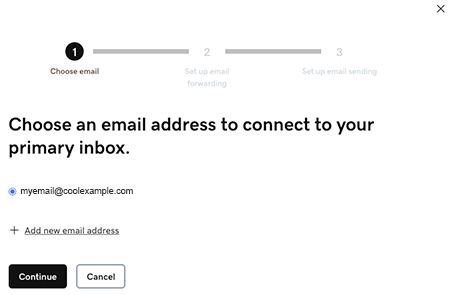
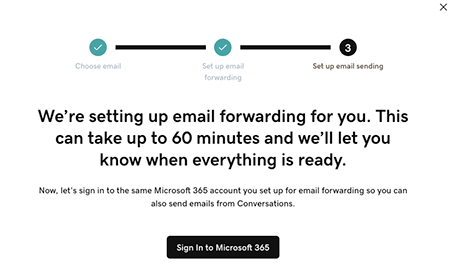
- Email forwarding will be set up for you. This could take up to 60 minutes, but you can continue setting up your email and we’ll let you know when forwarding is ready.
Sign in to the Microsoft 365 account you’re linking to Conversations. This must be the same account you used in Step 7.
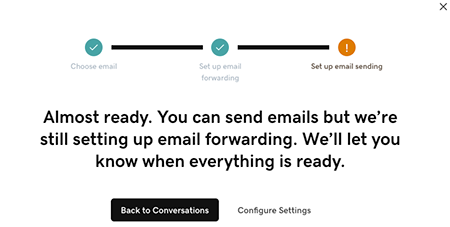
- Du får se en skärm som förklarar att din e-post fortfarande konfigureras.
- Logga in på din GoDaddy-mobilapp.
- At the bottom of the screen, tap Conversations to see a list of all your unarchived conversations.
- In the top-right corner, tap
 settings.
 - Tap Email. You may be asked to sign in to your GoDaddy account.
- Expand Email, and then tap Connect.
- Tap Microsoft 365, and then tap Next.
- Om du redan har en Microsoft 365-e-postadress visas den på skärmen. Om du inte gör det kommer du att uppmanas att skaffa en innan du kan fortsätta med de här stegen.
Välj den e-postadress du vill ansluta till Conversations och tryck sedan på Fortsätt . - Email forwarding will be set up for you. This could take up to 60 minutes, but you can continue setting up your email and we’ll let you know when forwarding is ready.
Sign in to the Microsoft 365 account you’re linking to Conversations. This must be the same account you used in Step 7.
- Du får se en skärm som förklarar att din e-post fortfarande konfigureras.
- Gå till din GoDaddy produktsida för i en webbläsare.
Om du har den fristående versionen av Conversations expanderar du Conversations Unified Inbox . Välj Webbinkorg till höger om ditt Conversations-paket.
ELLER
Om du har ett Websites + Marketing-paket bläddrar du till Websites + Marketing och väljer Hantera bredvid din webbplats. Expandera Conversations i den vänstra menyn.
- Välj Inställningar.
- Select Channels.
- Expand Email, and then tap Connect.
- Select Microsoft 365, and then tap Next.
- Om du redan har en Microsoft 365-e-postadress visas den på skärmen. Om du inte gör det kommer du att uppmanas att skaffa en innan du kan fortsätta med de här stegen.
Välj den e-postadress du vill ansluta till Conversations och tryck sedan på Fortsätt . - Email forwarding will be set up for you. This could take up to 60 minutes, but you can continue setting up your email and we’ll let you know when forwarding is ready.
Sign in to the Microsoft 365 account you’re linking to Conversations. This must be the same account you used in Step 7.
- Du får se en skärm som förklarar att din e-post fortfarande konfigureras.
Grattis! Du har länkat din e-postadress till GoDaddy Conversations. När vidarebefordran har slutförts börjar du få dina e-postmeddelanden direkt i din Conversations-inkorg.